Selasa, 19 Maret 2013

Acer Unveils Chrome-Based Laptops

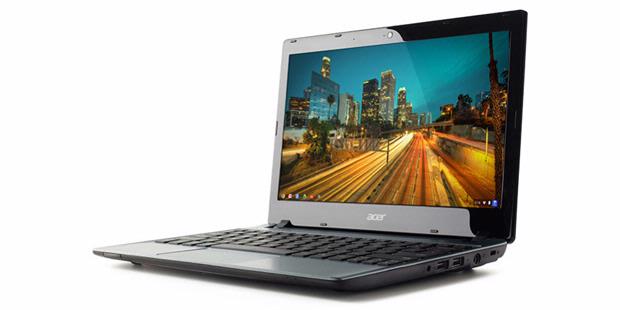
Acer has recently introduced a laptop device that uses Chrome operating system aka Chromebook. Product named Acer C7 has a fairly affordable price, which is $ 199

Chrome OS is an operating system based on Google's cloud development results. All required application can be accessed directly from the Internet. All data is also stored in cloud services.

Acer does not really give details of C7's specs. However, it is known that the laptop has a screen size of 11.6-inch display that can deliver a resolution of 1366 x 768. C7 Acer laptop has a weight of 1.5 kg.


Acer C7 also comes with 320GB of storage media. Acer is adding a cloud-based storage service, Google Drive, with super large capacity, the 100GB.


15 Most Dangerous Computer Viruses in History

Computer security company Kaspersky Lab, the birthday-15, recalling the 15 most dangerous computer virus that has attacked and complex computer networks in the world.
Here are 15 most influential dangerous viruses in history, as stated by Kaspersky in a press release on Tuesday (17/07/2012):

    
1986, the Brain, the first PC virus appeared: the virus is spread by writing code in the boot sector or a floppy disk.
    
1988, the Morris worm infected about 10 percent of computers connected to the internet (about 6,000 computers).
    
1992, Michelangelo, the first virus to massive media attention.
    
1995, Concept, the first macro virus.
    
1999, Melissa, began the era of e-mail malware that resulted in mass global epidemic.
    
2003, Slammer, worms fileless * no file), resulting in a massive epidemic worldwide.
    
2004, Cabir: Proof-of-Concept for the first Symbian; transmitted via Bluetooth.
    
2006, Leap, the first Mac OS X virus
    
2007, the Storm Worm [Zhelatin] pioneered the use of distributed C & C server.
    
2008, Koobface, the first malware that makes Facebook a target.
    
2008, Conficker, one of the biggest epidemics in history, infecting enterprise, home users and governments in more than 200 countries.
    
2010, FakePlayer, SMS Trojan on Android.
    
2010, Stuxnet, targeted attacks on SCADA systems [Supervisory Control and Data Acquisition], to mark the advent of the era of cyber war
    
2011, Duqu, sophisticated Trojan that gathers intelligence on the target
    
2012, Flame, highly sophisticated malicious program that is actively used as a weapon to attack cyber entities in some countries.

Like What the Future Laptop Intel version?


As to whether future laptops that will come a year from now? Intel has a vision about it and expose them at the exhibition CES 2013.

Laptop future processor manufacturer giant is coming in the form of "North Cape", a prototype laptop that is made to demonstrate the concept of future Intel laptop, especially the fourth-generation Core processors (Haswell) is scheduled to be released this summer.

As reported by Mashable, North Cape has a screen size of 13.3-inch touchscreen that can be removed to be used as a tablet device. Display area on the screen was so wide that leaves little room for the fingers of the hand holding the tablet.

However, it did not matter. Just press a button, the display area on the screen North Cape will shrink to 11 inches so that it can be operated as a more convenient tablet.

Another innovation is no less significant is the battery life is outstanding, reaching 13 hours, if the laptop in question is connected to the docking keyboard (battery stored in the display and docking module).

Five Features "Hidden" in Windows 8

Five-Features-Hidden-in-Windows8
Operating system Windows 8's new two different types of desktop environments that look and behave the same as in previous versions of Windows, as well as the Start Screen that looks fresh but not familiar with the old user.

For new users to upgrade, take some time to familiarize yourself with the workings of Microsoft's latest operating system.

Well, five of the "hidden" as quoted from TechRadar following can help ease the process of learning it.

1. Start Menu Secrets

When users hover over the lower left corner of the screen and clicking on the left, the Start Screen will be displayed.

But if that is clicked is the right mouse button, Windows 8 will feature a menu that includes access to a number of important areas like the Start Menu of the old, including the Control Panel, Command Prompt, and Task Manager.

It is much easier and faster than a similar gain access through the new Start Screen.